Telnyx now supports DTMF-based phone number verification, which allows you to verify phone numbers by simply pressing 1… See Telnyx guidance and requirements.
Overview
Telnyx now supports DTMF-based phone number verification, which allows you to verify phone numbers by simply pressing 1 during a verification call. This feature simplifies the verification process by eliminating the need to receive and enter a verification code manually.
How It Works
- You trigger a verification call via the API using the DTMF method
- The person associated with the phone number receives a call
- They are prompted to press 1 to authorize the verification
- If they press 1, the number is verified to your account
- If they don't press 1, the verification fails and you can retry
Note: The verification call does not mention Telnyx anywhere, maintaining privacy.
Single Number Verification
API Request:
POST /v2/verified_numbers {   "phone_number": "+1541234567",
  "verification_method": "dtmf" }
cURL Example:
curl --location 'https://api.telnyx.com/v2/verified_numbers'
\ --header 'Content-Type: application/json'
\ --header 'Authorization: Bearer YOUR_API_KEY'
\ --data '{   "phone_number": "+1541234567",
"verification_method": "dtmf" }'
Bulk Number Verification
To verify multiple phone numbers at once, you can loop through your list of numbers and make individual API calls for each: Python Example:
import requests
import time

API_KEY = "YOUR_API_KEY"
API_ENDPOINT = "https://api.telnyx.com/v2/verified_numbers"
phone_numbers = ["+15412345678", "+15412345679", "+15412345680"]

headers = {     "Content-Type": "application/json",     "Authorization": f"Bearer {API_KEY}" }

for phone_number in phone_numbers:
payload = {   "phone_number": phone_number,
"verification_method": "dtmf"     }

response = requests.post(API_ENDPOINT, json=payload, headers=headers)     print(f"Verification initiated for {phone_number}")
time.sleep(1)  # Delay to avoid rate limiting
Bash Script (for CSV Input):
#!/bin/bash API_KEY="YOUR_API_KEY"
API_ENDPOINT="https://api.telnyx.com/v2/verified_numbers"

while IFS= read -r phone_number; do
curl -s --location "$API_ENDPOINT" \
--header 'Content-Type: application/json' \
--header "Authorization: Bearer $API_KEY" \
--data '{"phone_number": "'$phone_number'", "verification_method": "dtmf"}'     sleep 1 done < phone_numbers.csv
Checking Verification Status
curl --location 'https://api.telnyx.com/v2/verified_numbers/+1541234567'
\ --header 'Authorization: Bearer YOUR_API_KEY'
Receiving Verification Events via Webhooks
You can also register a webhook to receive verification events automatically, instead of polling the API for status. Simply include a verification\_webhook\_url in your request:
POST /v2/verified_numbers
{
  "phone_number": "+1541234567",
  "verification_method": "dtmf",
  "verification_webhook_url": "https://your-api.com/api/verification_webhook"
}
Verification events will be pushed to your webhook URL in the following format:
json
{
"data": {
"event_type": "caller_id_verification.completed",
"id": "evt_abcd-456-hijsk-123",
"occurred_at": "YYYY-MM-DDT14:22:07.123456Z",
"payload": {
"phone_number": "+1245456784",
"record_type": "caller_id_verification",
"verification_method": "outbound_call",
"verified_at": "YYYY-MM-DDT14:21:58.654321Z"  //verification date
},
"record_type": "event"
}
}
Using the Mission Control Portal
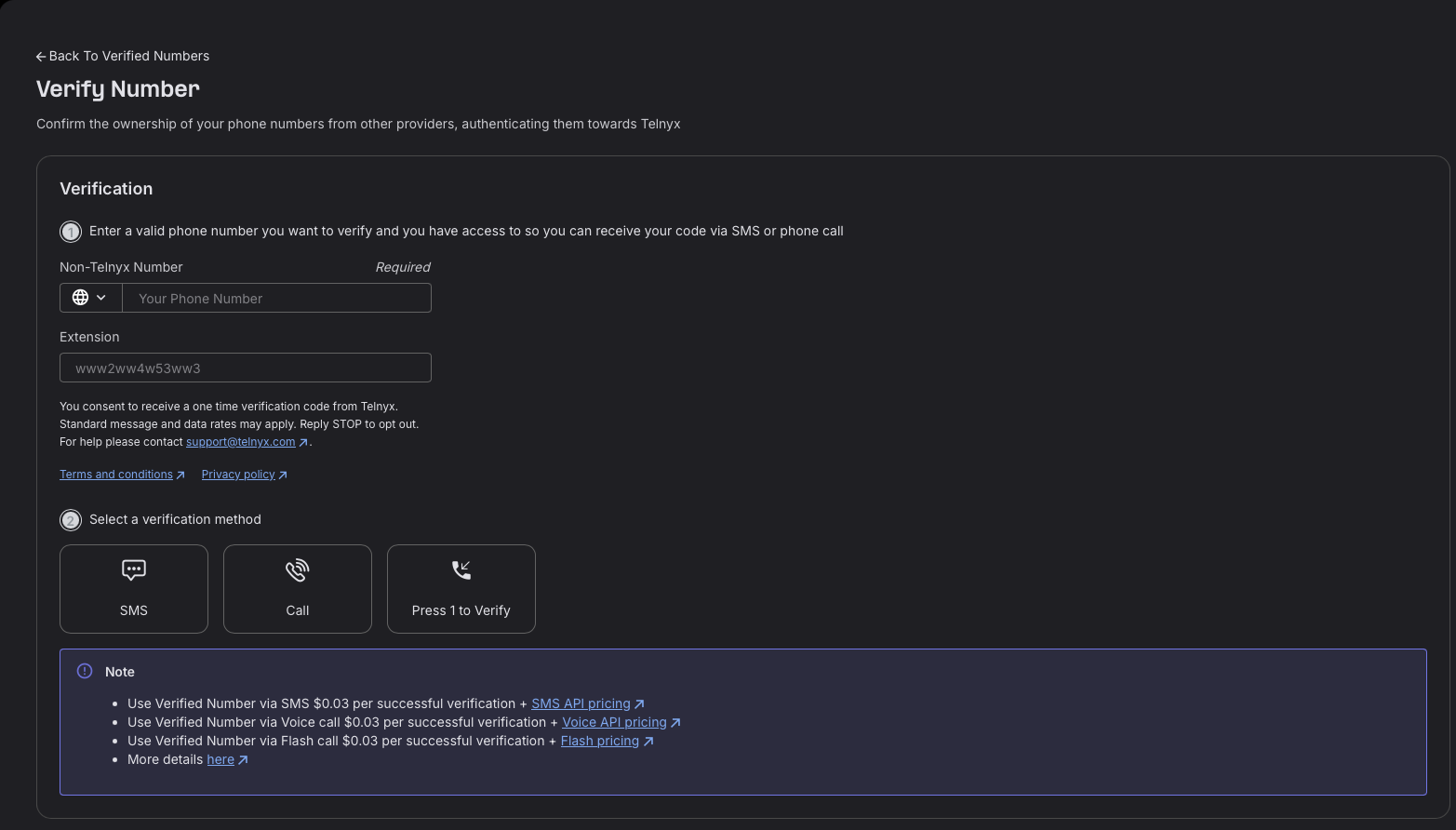
To trigger Press 1 to verify using the Mission Control Portal, follow the following steps; 1 - Login to your portal account and navigate to Numbers > Verify Numbers Section. 2 - Add number you want to verify. 3 - Click the "Press 1 to verify" button. Target Number will receive the verification call and if they press 1, that number will be listed in the Verified Numbers Tab.
Best Practices
• Add delays between bulk verification requests to avoid rate limiting • Implement error handling for failed verification attempts • If a user doesn't answer or press 1, you can retry the verification call • Keep track of verification statuses for your records Troubleshooting
• Verification call not received: Verify the phone number is correct and can receive calls • User didn't press 1 in time: Retry the verification call • Rate limit exceeded: Add delays between requests • Invalid phone number format: Ensure phone numbers are in E.164 format (e.g., +15412345678)